

Disclosure: CoinCodeCap has no affiliate deal with TrendSpider and earns nothing if you buy it. We may earn a commission from the TradingView link on this page, which does not change what we wrote about either product.
How We Reviewed TrendSpider: We read TrendSpider’s pricing page and help center, and TradingView’s pricing page, on 12 October 2026. We cross-checked prices and limits against two independent 2026 reviews (Stockbrokers.com, July 2026, and Day Trading Toolkit, updated September 2026) and captured the pricing page the same day. We did not run a paid account, so every figure below comes from those pages and every judgment is marked as ours. The review was researched and drafted with AI help, and each price and plan limit was re-checked by hand against TrendSpider’s and TradingView’s own pricing pages before publication.
TL;DR
- TrendSpider is a chart-automation platform. It draws trendlines for you and backtests rules without code. Alerts can feed bots.
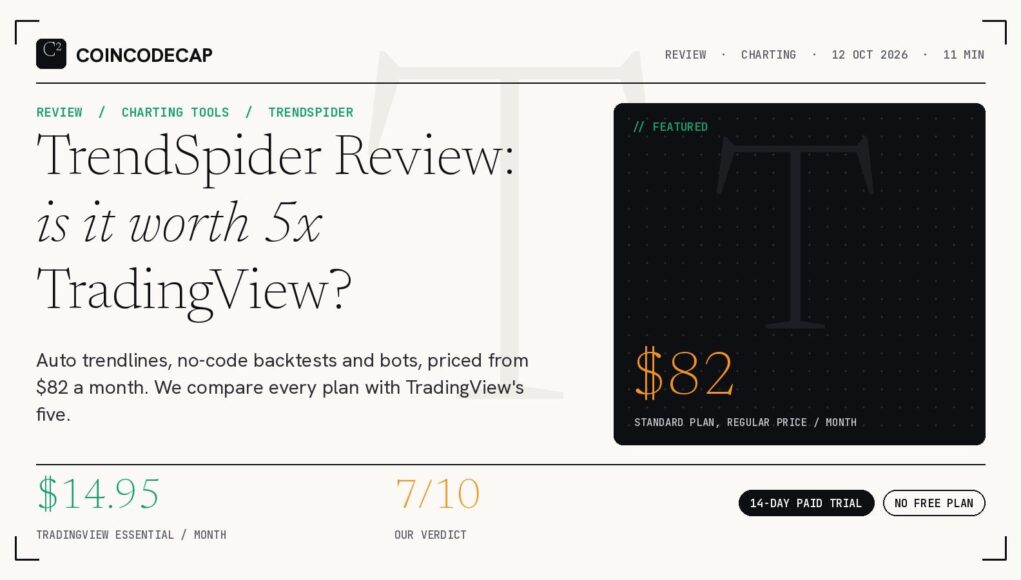
- Its regular price starts at $82 per month, and a first-year sale cuts that to $49.68. TradingView’s paid plans start at $14.95 per month.
- Crypto data is included on every plan, from about 170 exchanges. Order execution needs a separate service called SignalStack.
- Our verdict: 7 out of 10 for traders who test and automate strategies, and a poor buy for anyone who mainly wants good charts at a low price.
This TrendSpider review answers one question: is the platform worth several times the price of TradingView? For a trader who builds rules, tests them on history and wants alerts to run on their own, yes. For someone who opens a chart, draws a few lines and places a trade, no.
TrendSpider is not a broker and it does not hold your money. It is software for analysis and automation, sold by subscription. Crypto and stock traders both use it, and the same price list applies to both.

What TrendSpider Actually Does
The core idea is that the software does the chart work a trader would normally do by hand. It finds trendlines, support and resistance zones and Fibonacci levels on its own. It also reads candlestick patterns and flags them across timeframes.
Most traders who compare it with LuxAlgo or Trade Ideas care about the same split: TrendSpider automates the work around the chart, while indicator packs add signals on top of it. Our LuxAlgo vs TrendSpider vs Trade Ideas vs ChartingLens comparison goes through that difference in detail.
7 TrendSpider Features That Matter
1. Automated trendlines and patterns
Auto-drawn trendlines, Fibonacci levels and support and resistance zones are the product’s best-known trick. A drawn line also becomes an alert condition, so a break of a line you never drew by hand can still ping you. The platform ships with more than 400 indicators, according to Day Trading Toolkit.
2. Multi-timeframe analysis
You can overlay an indicator or pattern from a higher timeframe onto a lower one. A daily trend line shows up on a 15-minute chart, for example. This is the feature most self-taught traders end up using daily.
3. No-code Strategy Tester
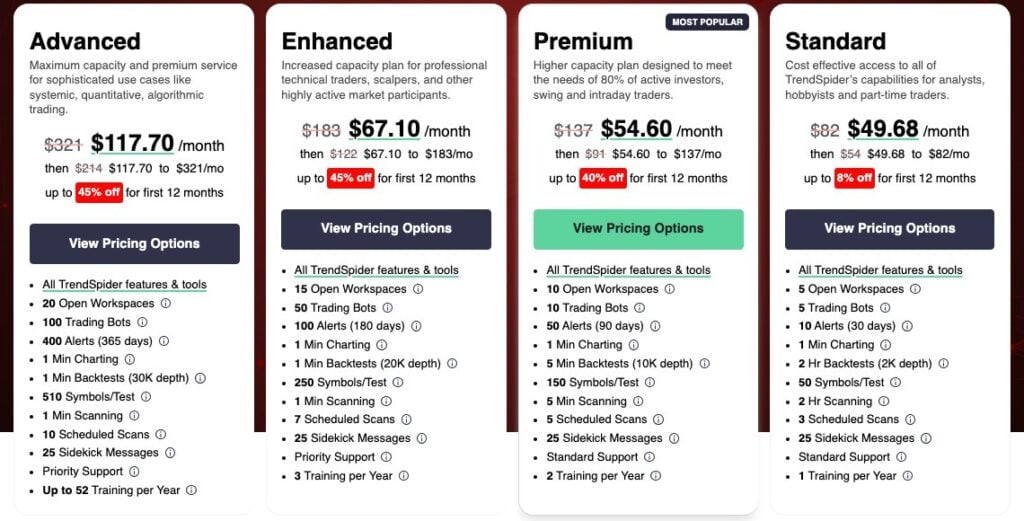
You build entry and exit rules with menus instead of code, then test them on history. The tester models trading costs and runs variance tests, and a group version tests a rule across many symbols at once. How far back and how fine the test goes depends on your plan: 2-hour bars on Standard, 5-minute on Premium, 1-minute on Enhanced and Advanced.
4. ML Quant Lab (formerly Strategy Lab)
This tool trains machine learning models, such as random forest and logistic regression, on your own data and timeframes. TrendSpider’s own site uses the ML Quant Lab name in its menu, while the older ML Strategy Lab name still appears on its homepage. Models are only as good as the history behind them, so test any output on fresh data before you trust it.
5. Strategy Bots and alerts
A Strategy Bot runs a tested rule forward in time and fires a webhook, SMS or email when it triggers. The bot does not place orders itself. To trade from it you connect SignalStack, which converts the alert into an order at a supported broker or crypto exchange. Plan limits for live bots run from 5 on Standard to 100 on Advanced. If you want a plain overview of bot types before choosing, read our guide to the different types of crypto trading bots.
6. Scanners and Sidekick AI
The Market Scanner accepts plain-English requests and can run on a schedule. Sidekick is TrendSpider’s chat assistant. It can build and save scans, create alerts and bots, explain indicators and write custom indicator code in JavaScript. TrendSpider’s help center says it cannot browse the internet, cannot place trades, and cannot judge trendline quality.
Every account gets 25 free Sidekick messages per month. More messages cost extra: $49 per month for 100, $129 for 300 and $349 for 1,000, per the pricing page. If you plan to lean on the assistant, add that to the plan price.
7. Market data, including crypto
TrendSpider’s help center says crypto pairs are available from 170 exchanges, and you can view the same pair as priced on Binance, Coinbase, Kraken or Gemini. Day Trading Toolkit adds that real-time crypto data costs nothing extra on any plan. The company also announced support for crypto futures data on its blog, though we could not find a dated, complete list of supported futures venues. Options traders get an options chain and Expected Move tools, with real-time OPRA data as a $9.50 monthly add-on.
TrendSpider Pricing: 4 Plans Compared
TrendSpider sells four plans: Standard, Premium, Enhanced and Advanced. All of them include the same features and market data. The plans differ only in limits: workspaces, alerts, bots, backtest depth and support level.
We read the pricing page on 12 October 2026. It lists regular prices of $82, $137, $183 and $321 per month for the four plans. A flash sale on the same page cuts the first year to $49.68 to $117.70 per month, after which the page quotes a renewal range for each plan. Sale terms often change, so check the checkout total before you pay.
Sources: TrendSpider pricing page (read 12 October 2026) for trial fees, promo prices, bots and alerts; Stockbrokers.com (July 2026) and Day Trading Toolkit (updated September 2026) for list prices.
Trial and refund terms
There is no free plan. The 14-day trial is paid, costs $19 to $49 depending on the plan, and the trial fee is non-refundable. If you buy a full plan, the FAQ allows a refund request within 72 hours of the first charge, minus the trial fee. The flash-sale terms on the same page call promotional purchases final, so assume the promo price carries no refund.
Extra costs to budget for
- Real-time futures data: $7.50 per month for non-professional users
- Real-time OPRA options data: $9.50 per month
- Professional US equities data: $29 per month
- Deeper backtests on Standard or Premium (20,000 bars): $39 per month
- Sidekick message packs: $49, $129 or $349 per month
A Standard subscriber who adds futures data and the $49 Sidekick pack pays more than the headline number by a wide margin. Run that sum before you start the trial.
TrendSpider vs TradingView: Where Each Wins
TradingView is the default charting tool for most retail traders, and our TradingView Hub review covers it in full. It has a free plan, a huge community library of scripts and wide exchange and broker connections. Its paid plans cost far less than TrendSpider’s.
The two do different jobs. TradingView gives you excellent charts and lets you build the tools yourself, using the Pine Script language. TrendSpider builds some of those tools for you and adds automated testing and bots. Stockbrokers.com scored TradingView higher overall in July 2026 (5.0 against 4.0), with the gap coming from cost (4.5 against 2.5). Features scored equally at 5.0 each.
For TradingView’s own accuracy and data quality, see how TradingView provides accurate high-frequency charts.
Sources: TrendSpider and TradingView pricing pages (read 12 October 2026), TrendSpider help center, Stockbrokers.com (July 2026). TradingView’s page showed local-currency prices to us, so its dollar figures come from the two reviews cited in the next section.
TradingView plan prices
TradingView sells five paid plans next to its free Basic plan. Its pricing page, read in US dollars on 12 October 2026, lists Essential at $14.95 per month, Plus at $34.95, Premium at $69.95, Expert at $119.95 and Ultimate at $239.95. Annual billing costs less per month on every plan.
The limits we could read directly on TradingView’s page: Basic allows 2 indicators per chart, Essential 5, Plus 10, Premium 25 and Ultimate 50. Charts per tab rise from 2 to 16, and alert counts from 20 to 1,000 across the paid tiers. For more on spending less on charts, read our list of TradingView alternatives for crypto price tracking.
Where TrendSpider Falls Short
Day Trading Toolkit estimates two to four weeks of onboarding before the platform pays off. That matches how dense the interface is. Reviewers also note it is not built for scalping or high-frequency trading.
Crypto traders should know three limits. TrendSpider cannot send an order by itself, so you need SignalStack and a supported exchange. We found no dated, complete list of supported exchanges and brokers. And TrendSpider’s mobile app works as a companion to the web platform and does not replace it. Its last update in the US app store listing was 9 July 2026.
Data has gaps too. Over-the-counter and some index data arrive 10 to 15 minutes late by default, and single stocks on the NSE, LSE, TSX and HKEX are not supported. If you want a wider look at AI-assisted tools, see our best AI tools for stock trading.
Who Should Pay for TrendSpider
It makes sense for a rules-based trader who tests ideas before risking money and wants alerts without staring at charts. A swing trader with 50 symbols on a watchlist is the target customer. Our guide to the best crypto trading bots covers cheaper ways to automate if you only need execution.
It makes little sense for a beginner, a long-term holder, or anyone who trades a few times per month. For that person, TradingView’s free or Essential plan does the job at a fraction of the cost. Traders weighing a signal-overlay approach instead can compare it with LuxAlgo, or read the wider LuxAlgo vs TrendSpider vs Pineify vs Composer breakdown.
Pros and Cons
Expert Tip: Start on Standard and run the paid trial as a project. Build one strategy, backtest it on your own pairs, and wire one alert to SignalStack before day 14. If you cannot finish that, the platform will not repay the monthly price. If you can, pick the plan by the one limit you actually hit, usually alerts or backtest depth.
6 Frequently Asked Questions About TrendSpider
Is TrendSpider worth it?
It is worth it for traders who backtest, automate and scan many symbols. For occasional trading it is not, because TradingView covers the basics for far less. We rate it 7 out of 10, scoring it down mainly for price and the learning curve.
How much does TrendSpider cost?
The pricing page lists $82, $137, $183 and $321 per month for Standard, Premium, Enhanced and Advanced. On 12 October 2026 a flash sale cut the first year to $49.68 to $117.70 per month. Data and Sidekick add-ons cost extra.
Does TrendSpider have a free trial?
It has a 14-day trial, but you pay $19 to $49 for it and the fee is not refundable. There is no free plan. A refund on a full plan can be requested within 72 hours of the first charge, minus the trial fee.
Is TrendSpider good for crypto?
It works well for charting and testing crypto strategies, with pairs from about 170 exchanges and real-time crypto data included. It falls short as a one-stop crypto tool because trades go through SignalStack, and we found no complete list of exchanges where that works.
Is TrendSpider better than TradingView?
It is better at automation and no-code testing. TradingView is better on price, community, scripts and ease of use. Stockbrokers.com picked TradingView overall in July 2026.
Can I backtest without coding on TrendSpider?
Yes. The Strategy Tester uses menus for entries and exits and models costs. Your plan sets how fine the data is: 2-hour bars on Standard, down to 1-minute on Enhanced and Advanced.
Bottom Line: TrendSpider earns its price only if you will use the backtester, bots and scanners every week. Otherwise, start with TradingView, which costs less and has a free plan to try first. We rate TrendSpider 7 out of 10: strong tools, but a price and learning curve that fit a narrow group of traders.
By the CoinCodeCap Editorial Team. Last checked 12 October 2026. Prices change often, so confirm them on each company’s own site before you buy. This review is information, not financial advice.
Related Reading
TrendSpider Comparisons
TradingView Guides
Trading Bots and Automation
Tools and Data